Datum
Data, Seamlessly Synced
Offline-First Data Synchronization for Dart & Flutter#
Datum is a powerful and easy-to-use framework for building offline-first applications with Dart and Flutter. It provides a seamless way to synchronize data between your local database and a remote server, ensuring your app remains functional even without a network connection.
Key Features#
- Offline-First: Your app works seamlessly, whether online or offline.
- Automatic Synchronization: Data is automatically synchronized between the local and remote databases.
- Conflict Resolution: Built-in conflict resolution strategies to handle data conflicts.
- Support for Dart & Flutter: Use Datum in your Dart backend and Flutter applications.
Who is Datum For?#
You should consider Datum if you are building an application that:
- Needs to work offline: From field service apps to content-heavy media apps, Datum ensures a seamless user experience, regardless of network connectivity.
- Requires real-time collaboration: If you're building a tool where multiple users edit the same data, Datum's conflict resolution and real-time sync are essential.
- Has a complex data model: For apps with relational data that needs to be available on the device.
- You want to avoid backend lock-in: Datum's adapter-based architecture gives you the freedom to choose—and change—your database and backend services without rewriting your app's business logic.
Getting Started#
New to Datum? Here's how to get started:
-
Define your entities: Learn about
DatumEntityandRelationalDatumEntity - Set up initialization: Configure and initialize the Datum system
- Work with relationships: Define and use entity relationships
- Query your data: Filter, sort, and paginate data
- Implement adapters: Create local and remote adapters
- Master sync patterns: Handle app startup, login, and data synchronization
- Use the Singleton API: Convenient access to all Datum operations
- Advanced sync patterns: Production-ready synchronization features
🚀 What's Next#
- Coming Soon: Planned features and documentation improvements
Core Concepts#
Datum is built around a few key ideas:
-
DatumEntity: The base class for your data models. It requires a uniqueid,userId, and other metadata for synchronization. -
RelationalDatumEntity: ExtendsDatumEntitywith relationship support for connecting entities. -
Adapter: The bridge between Datum and your data sources.LocalAdapter: Manages data persistence on the device (e.g., Hive, Isar, SQLite).RemoteAdapter: Communicates with your backend (e.g., a REST API, Supabase, Firestore).
-
Datum: The main entry point for interacting with your data. It provides a unified API for CRUD operations, queries, and synchronization. - Offline-First: All data operations are performed on the local database first, ensuring a snappy UI. Datum then automatically syncs changes to the remote backend when a connection is available.
Why Datum?#
Datum isn't just another local database; it's a complete data synchronization framework. While databases like ObjectBox or Hive are excellent at storing data locally and are very fast, Datum's primary goal is to solve the much harder problem of keeping that local data effortlessly in sync with a remote backend, all while providing a seamless offline-first experience.
You choose Datum when your application's data needs to live on both the device and a server, and you want to stop writing complex, error-prone boilerplate code for syncing, conflict resolution, and real-time updates.
Key Differentiators: Why Choose Datum?#
Here are the core strengths of Datum broken down.
1. Backend Agnosticism: The "Universal" Adapter Model#
The Problem: Many solutions lock you into their specific backend. If you use ObjectBox Sync, you sync to an ObjectBox server. If you use Firestore's offline persistence, you're locked into Firestore.
Datum's Solution: Datum uses a brilliant Adapter pattern. You have a
LocalAdapter (for Hive, Isar, etc.) and a RemoteAdapter (for Supabase, a custom REST API, etc.). Your application code only ever talks to the
DatumManager. This means you can swap your entire backend or local database without changing your app's business logic.
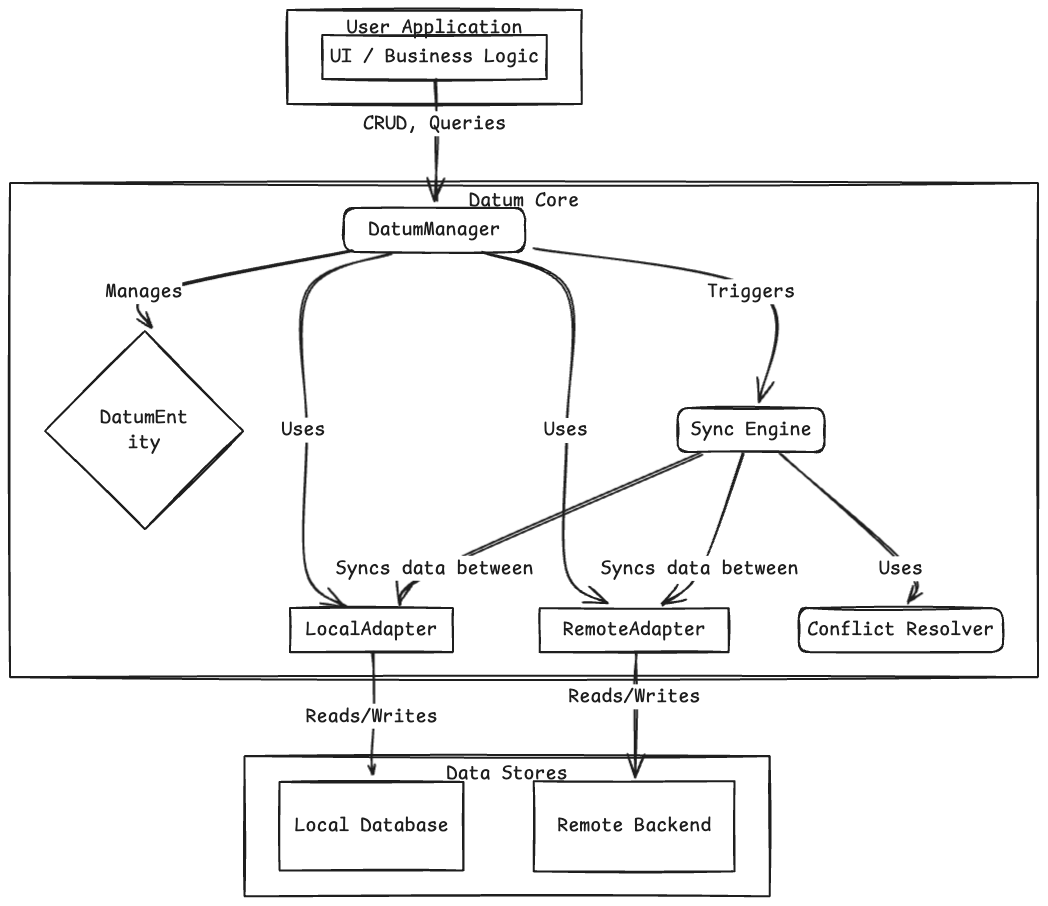
- Migrate your backend? Just write a new
RemoteAdapter. - Switch local databases? Just write a new
LocalAdapter.
This makes your application incredibly flexible and future-proof.
2. Built-in "Smart" Synchronization & Conflict Resolution#
The Problem: Writing sync logic manually is a nightmare. You have to track changes, handle network failures, manage retries, and resolve conflicts when the same data is changed in two places at once.
Datum's Solution: This is all handled automatically.
- Offline Queue: All local changes (create, update, delete) are automatically added to a reliable queue and processed when a network connection is available.
-
Conflict Resolution: Datum detects conflicts and provides pre-built strategies (
LastWriteWins,LocalPriority,RemotePriority). Most importantly, you can implement your own custom logic to resolve conflicts in a way that makes sense for your specific data.
3. A Single, Unified API for Everything#
The Problem: Without a framework like Datum, you often find yourself juggling multiple APIs: one for your local database (e.g.,
box.put()) and another for your remote backend (e.g., dio.post()). This leads to boilerplate, inconsistencies, and increased complexity.
Datum's Solution: Datum provides a single, unified API through its Datum.instance
singleton. This means you interact with your data consistently, regardless of whether it's a local operation, a remote sync, or a reactive stream. This dramatically simplifies your application code, making it cleaner, more readable, and less prone to bugs.
Let's explore the core functionalities available directly through Datum.instance.
3.2. Basic CRUD Operations
Perform Create, Read, Update, and Delete operations through entity managers. Datum handles the local persistence and queues changes for synchronization with your remote backend.
// Assuming Datum has been initialized as shown above

// Get the manager for Task entities
final taskManager = Datum.manager<Task>();

// CREATE: Add a new task
Future<void> addNewTask(String title, String userId) async {
  final newTask = Task(
    id: const Uuid().v4(),
    userId: userId,
    createdAt: DateTime.now(),
    modifiedAt: DateTime.now(),
    version: 1,
    title: title,
  );
  await taskManager.push(item: newTask, userId: userId);
  print('Created task: "${newTask.title}" (ID: ${newTask.id})');
}

// READ (single): Retrieve a task by its ID
Future<Task?> getTaskDetails(String taskId, String userId) async {
  final task = await taskManager.read(taskId, userId: userId);
  if (task != null) {
    print('Read task: "${task.title}" (Version: ${task.version})');
  } else {
    print('Task with ID $taskId not found.');
  }
  return task;
}

// READ (all): Retrieve all tasks for a user
Future<List<Task>> getAllUserTasks(String userId) async {
  final tasks = await taskManager.readAll(userId: userId);
  print('Found ${tasks.length} tasks for user $userId.');
  return tasks;
}

// UPDATE: Modify an existing task
Future<void> updateTaskTitle(Task task, String newTitle) async {
  final updatedTask = task.copyWith(
    title: newTitle,
    modifiedAt: DateTime.now(),
    version: task.version + 1,
  );
  await taskManager.push(item: updatedTask, userId: task.userId);
  print('Updated task ID ${task.id} to: "${updatedTask.title}"');
}

// DELETE: Remove a task by its ID
Future<void> removeTask(String taskId, String userId) async {
  final success = await taskManager.delete(id: taskId, userId: userId);
  if (success) {
    print('Deleted task with ID: $taskId');
  } else {
    print('Failed to delete task with ID: $taskId');
  }
}
3.3. Reactive Data Access (Watching)
Datum is built for reactivity. Use watch methods to get Streams that automatically emit new data whenever changes occur, whether from local user actions or remote synchronization.
import 'dart:async'; // For StreamSubscription

// Watch all tasks for a user
StreamSubscription? allTasksSubscription;
void startWatchingAllTasks(String userId) {
  allTasksSubscription = Datum.instance.watchAll<Task>(userId: userId)?.listen((tasks) {
    print('--- All Tasks Updated (${tasks.length}) ---');
    for (final task in tasks) {
      print('- [${task.id.substring(0, 4)}] ${task.title} (v${task.version})');
    }
  });
}

void stopWatchingAllTasks() {
  allTasksSubscription?.cancel();
  print('Stopped watching all tasks.');
}

// Watch a single task by its ID
StreamSubscription? singleTaskSubscription;
void startWatchingSingleTask(String taskId, String userId) {
  singleTaskSubscription = Datum.instance.watchById<Task>(taskId, userId)?.listen((task) {
    if (task != null) {
      print('--- Single Task $taskId Updated ---');
      print('Title: ${task.title}, Version: ${task.version}');
    } else {
      print('Task $taskId deleted or not found.');
    }
  });
}

// Watch a paginated list of tasks
StreamSubscription? paginatedTasksSubscription;
void startWatchingPaginatedTasks(String userId) {
  const paginationConfig = PaginationConfig(pageSize: 5);
  paginatedTasksSubscription = Datum.instance.watchAllPaginated<Task>(paginationConfig, userId: userId)?.listen((result) {
    print('--- Paginated Tasks (Page ${result.currentPage}/${result.totalPages}) ---');
    for (final task in result.items) {
      print('- ${task.title}');
    }
  });
}

// Watch tasks matching a specific query
StreamSubscription? queriedTasksSubscription;
void startWatchingQueriedTasks(String userId) {
  final query = DatumQueryBuilder<Task>()
      .where('title', startsWith: 'Urgent')
      .orderBy('createdAt', descending: true)
      .build();
  queriedTasksSubscription = Datum.instance.watchQuery<Task>(query, userId: userId)?.listen((tasks) {
    print('--- Queried Tasks (Urgent) Updated (${tasks.length}) ---');
    for (final task in tasks) {
      print('- ${task.title}');
    }
  });
}
3.4. One-time Queries
For fetching data without continuous updates, use the query method. You can specify the
DataSource (local or remote).
// Fetch tasks that are marked as 'completed' from the local database
Future<List<Task>> getCompletedTasksLocally(String userId) async {
  final query = DatumQueryBuilder<Task>()
      .where('isCompleted', isEqualTo: true) // Assuming 'isCompleted' field exists
      .build();
  final completedTasks = await Datum.instance.query<Task>(query, source: DataSource.local, userId: userId);
  print('Locally found ${completedTasks.length} completed tasks.');
  return completedTasks;
}

// Fetch tasks directly from the remote backend (bypassing local cache)
Future<List<Task>> getTasksFromRemote(String userId) async {
  final query = DatumQueryBuilder<Task>().build(); // Fetch all from remote
  final remoteTasks = await Datum.instance.query<Task>(query, source: DataSource.remote, userId: userId);
  print('Remotely found ${remoteTasks.length} tasks.');
  return remoteTasks;
}
3.5. Working with Relationships
Datum simplifies managing relationships between different DatumEntity types.
// Assuming you have a 'Project' entity and a 'tasks' relation defined on it.
// (You would need to define Project as a RelationalDatumEntity)

// Fetch related tasks for a specific project
// Future<List<Task>> getTasksForProject(Project project) async {
//   final projectTasks = await Datum.instance.fetchRelated<Project, Task>(project, 'tasks');
//   print('Project "${project.name}" has ${projectTasks.length} tasks.');
//   return projectTasks;
// }

// Watch related tasks for a specific project (real-time updates)
// StreamSubscription? projectTasksSubscription;
// void startWatchingProjectTasks(Project project) {
//   projectTasksSubscription = Datum.instance.watchRelated<Project, Task>(project, 'tasks')?.listen((tasks) {
//     print('--- Project "${project.name}" Tasks Updated (${tasks.length}) ---');
//     for (final task in tasks) {
//       print('- ${task.title}');
//     }
//   });
// }
3.6. Synchronization Control & Health Monitoring
Manage the synchronization process and monitor the health of your Datum setup.
// Manually trigger a full synchronization cycle for a user
Future<void> triggerManualSync(String userId) async {
  print('Initiating manual sync for user: $userId...');
  final result = await Datum.instance.synchronize(userId);
  print('Sync completed. Synced: ${result.syncedCount}, Failed: ${result.failedCount}, Conflicts: ${result.conflictsResolved}');
}

// Pause all ongoing and future synchronization operations
void pauseAllSyncs() {
  Datum.instance.pauseSync();
  print('All Datum synchronization paused.');
}

// Resume all paused synchronization operations
void resumeAllSyncs() {
  Datum.instance.resumeSync();
  print('All Datum synchronization resumed.');
}

// Check the health status of a specific entity's adapters
Future<void> checkTaskEntityHealth() async {
  final health = await Datum.instance.checkHealth<Task>();
  print('Health status for Task entity: ${health.status.name}');
  if (health.errors.isNotEmpty) {
    print('Health errors: ${health.errors.map((e) => e.message).join(', ')}');
  }
}

// Watch the aggregated health status of all registered entities
StreamSubscription? allHealthsSubscription;
void startWatchingAllHealths() {
  allHealthsSubscription = Datum.instance.allHealths.listen((healthMap) {
    print('--- Overall System Health Update ---');
    healthMap.forEach((entityType, health) {
      print('- ${entityType.toString().split('<').first}: ${health.status.name}');
    });
  });
}

// Watch the synchronization status for a specific user
StreamSubscription? userStatusSubscription;
void startWatchingUserSyncStatus(String userId) {
  userStatusSubscription = Datum.instance.statusForUser(userId)?.listen((statusSnapshot) {
    if (statusSnapshot != null) {
      print('--- User $userId Sync Status ---');
      print('Status: ${statusSnapshot.status.name}, Pending Ops: ${statusSnapshot.pendingOperationsCount}');
    }
  });
}
3.7. Disposal
It's crucial to dispose of the Datum instance when your application is shutting down to release resources and prevent memory leaks.
// Call this when your application is terminating (e.g., in main's dispose method)
Future<void> shutdownDatum() async {
  await Datum.instance.dispose();
  print('Datum instance and all managers disposed successfully.');
}
4. Designed for Real-time and Reactivity#
Datum is built with streams at its core. The watchAll(), watchById(), and watchQuery()
methods provide streams that automatically emit new data whenever it changes—whether from a local user action or a real-time push from the server. This makes building reactive UIs effortless.
Comparison Table#
| Feature | Simple Local DB (e.g., Hive) | DB with Sync (e.g., ObjectBox) | Datum |
|---|---|---|---|
| Primary Goal | Fast local storage | Local storage + proprietary sync | Unify any local DB with any backend |
| Backend Agnostic | ❌ (N/A) | ❌ (Proprietary backend) | ✅ (Key Differentiator) |
| Conflict Resolution | ❌ (Manual) | ✅ (Basic/Limited) | ✅ (Advanced & Customizable) |
| Offline Queue | ❌ (Manual) | ✅ | ✅ (Built-in & Automatic) |
| Unified API | ❌ (Separate APIs) | ❌ (Sync state management) | ✅ (Single API for all data ops) |
| Cost Model | ✅ (Free & Open Source) | 💰 (Commercial Subscription) | ✅ (Free & OpenSource) |
For a detailed discussion on the cost model and architectural considerations, please refer to Costs and Licensing.
The Elevator Pitch#
You use Datum because you want to build a robust, offline-first application without spending months building a complex and fragile sync engine. It gives you the power of a unified, real-time data layer while giving you the freedom to choose the best local database and backend for your specific needs, both today and in the future.